
How to Optimize Resin 3D Printer Build Plates for Batch Jewelry Production

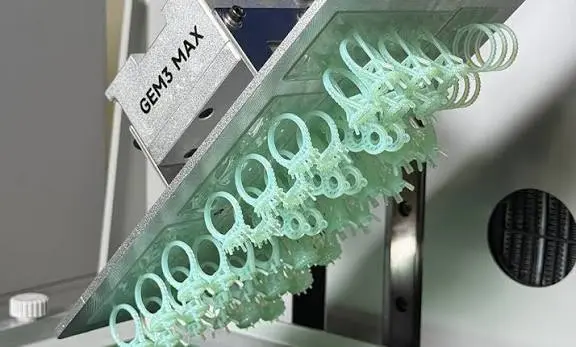
Printing one ring is easy. Printing fifty rings, pendants, and earrings in a single run is a different challenge.
When you move from one-off pieces to batch production, the build plate becomes your most valuable space. A well-planned plate gives you more patterns per hour, fewer failures, and cleaner castings. A poorly planned plate wastes resin, time, and sometimes the whole batch.
This guide explains how to optimize your resin 3D printer build plate for batch jewelry production. It covers layout, orientation, supports, spacing, settings, and a simple workflow you can repeat every day.
Why Build Plate Layout Matters in Jewelry Production
Most jewelry workshops print castable patterns that are later burned out and cast in gold, silver, or brass. These patterns are small and detailed, so a plate full of them can hold a lot of value.
Here is the key point many beginners miss. On an MSLA resin printer, print time depends mostly on the height of your models, not how many you print. Every layer is exposed all at once, so ten rings take almost the same time as one ring, as long as they are the same height and fit on the plate.
That means smart batching is the fastest way to increase output. Instead of running five short prints, you can fill the plate once and let the printer work through the night.
A good layout also helps you:
- Reduce failed prints and wasted castable resin
- Keep detail consistent across every piece
- Save time on cleanup and support removal
- Make casting trees faster to build
- Get predictable results from day to day
Start with a Clean, Level Build Plate
Before you think about layout, make sure the plate itself is ready. A perfect layout cannot fix a poor first layer.
- Check leveling. An uneven plate means some patterns stick well and others do not.
- Clean the plate. Remove cured resin specks and wipe away oil or residue.
- Inspect the surface. Deep scratches or a damaged plate can affect adhesion.
- Check the vat and film. A worn release film can cause failures unrelated to your layout. Our guide to NFEP film explains when to replace it.
- Mix the resin well. Castable resin settles, and uneven resin means uneven results across the plate.
If prints keep failing even after these checks, our article on why resin 3D prints fail can help you find the cause.
Choose the Right Orientation for Jewelry Patterns
Orientation is one of the biggest decisions you will make. It affects detail, surface quality, support placement, and how strongly the print pulls against the release film.
Tilt Your Models
Orientation is one of the biggest decisions you will make. It affects detail, surface quality, support placement, and how strongly the print pulls against the release film.
Tilt Your Models
Avoid printing large flat surfaces directly parallel to the plate. A flat layer forces the printer to peel a large area at once, which raises the risk of failure.
Tilting a piece reduces the area exposed in each layer. For many jewelry designs, a tilt of roughly 30 to 45 degrees is a common starting point. You should test it with your own designs, since every shape behaves differently.
Protect the Visible Surfaces
Supports leave small marks where they touch the model. Place those marks where they will not matter.
- Rings: keep supports away from the outer surface and any stone seats. Many jewelers support the inside edge of the shank or the underside.
- Pendants: support the back, not the front face.
- Earrings and studs: support from the back or the post area.
- Stone settings: keep prongs and seats clear of supports so the edges stay sharp.
A good rule is to ask, “Which side will I polish or set stones on?” and keep supports away from it.
Keep Similar Pieces Together
Group models of similar height and size on the same plate. Because print time follows the tallest model, one tall piece can slow down the whole run. Printing similar items together keeps every plate efficient.
Smart Spacing: How Close is Too Close?
Packing more pieces on the plate is great, but overcrowding causes problems.
- Leave a small gap between models. A few millimeters is a practical starting point. Too tight and resin can get trapped, supports can touch, and cleaning becomes harder.
- Stay away from the plate edges. Light can be weaker toward the edges of the screen, so detail may be less consistent there. Keep your most important pieces nearer the center.
- Do not overlap supports. Neighboring supports that touch each other are hard to separate and can damage the patterns.
- Leave room for resin flow. Resin needs to flow around the models as the plate moves.
If your printer has a high-resolution screen, you can place small details more precisely, but spacing rules still apply. If you are weighing resolution options, our guide on 8K vs 16K resin 3D printers can help.
Supports: Strong Enough to Hold, Small Enough to Remove
Supports are the difference between a successful batch and a ruined one. For jewelry, they need to be strong during printing but gentle on the model.
Use Small Contact Points
Smaller support tips leave smaller marks and are easier to clean up. However, very small tips can snap, so adjust based on the size and weight of each piece. Heavier or more isolated parts need stronger support.
Support Islands First
An island is a part of the model that starts printing in mid-air, such as the lowest point of a tilted ring. Make sure every island has a support. Missing even one can create a failed layer that ruins the pattern.
Do Not Over-Support
More supports are not always better. Too many leave extra marks and add cleaning time. The goal is strong but efficient support structures.
Build a Raft or Strong Base
A raft spreads the load across the first layers and helps all patterns stick evenly. It also makes it easier to lift the whole batch off the plate after printing.
Check Before You Print
Use your slicer’s support preview and look for red or flagged areas. Fix those before starting the print. A few minutes here can save an entire plate.
Plan for the Casting Process Too
A jewelry pattern is not the end product. It still needs to be burned out and cast, so your plate layout should make that step easier.
- Add sprues in the design stage. If you plan casting sprues and gates in advance, you save time later. Our guide on how to design jewelry models for resin 3D printing and metal casting covers this in detail.
- Think about the casting flask. Group pieces that will go on the same tree.
- Use the right resin. Castable resin is made to burn out cleanly. Our jewellery castable resin range is made for this workflow.
- Keep metal weight in mind. Larger pieces need more metal and different sprue sizes, so avoid mixing very different sizes in one batch when you can.
- Follow the resin manufacturer’s burnout instructions. Never skip or rush the recommended schedule.
For a full look at the process from print to finished metal, read our complete jewelry casting workflow with 3D printing.
Dial in Your Print Settings for Batch Runs
Layout and settings work together. A great plate layout with the wrong exposure will still fail.
- Layer height: Jewelry often uses fine layers to capture small details. Choose a layer height that suits your printer and resin.
- Bottom exposure: A full plate pulls harder on the first layers, so make sure bottom exposure is enough for strong adhesion without making the base too hard to remove.
- Normal exposure: Use the resin manufacturer’s recommended value and fine-tune with an exposure test. Do not guess.
- Lift speed and distance: Slower lifts reduce the peel force on delicate patterns.
- Temperature: Resin that is too cold behaves differently and can cause failures. Keep your workspace at a steady, comfortable temperature.
Run a calibration print whenever you change resin, switch to a new bottle, or notice the quality changing. One small test can prevent a failed full plate.
Do Not Overload the Plate
It is tempting to fill every corner, but a fully packed plate has more total area being peeled in each layer. That raises the risk of failure.
A safer approach is:
- Start with a moderate number of pieces.
- Run a few successful batches.
- Increase the count gradually.
- Stop when you see quality drop or failures appear.
Every printer and resin combination has a comfortable limit. Finding yours is worth the effort, because it becomes your standard batch size.
Keep Track of Your Batches
Batch production is easier when you can repeat what works. A simple log helps a lot.
Write down:
- Resin brand and batch
- Exposure and lift settings
- Layer height
- Number of pieces
- Orientation and support settings
- Any failures and what you changed
If you print many similar designs, save a plate layout as a template. Reusing a layout that already worked saves time and removes guesswork.
Post-Processing Your Batch
A good print can still be ruined after it leaves the printer. Follow a consistent routine:
- Let the plate drip. Allow excess resin to drain before removal.
- Remove the plate and wash carefully. Follow the recommended wash method for your resin, and avoid leaving delicate patterns in cleaning solution for too long.
- Dry completely. Trapped cleaning liquid can affect curing.
- Remove the patterns gently. Use a thin tool and take your time with delicate pieces.
- Cure according to the resin’s instructions. More curing is not always better. Over-curing can make patterns brittle.
- Inspect each piece. Check for missing details, bent prongs, and surface flaws before casting.
For more detail, see our guide on post-processing castable resin prints.
A Simple Build Plate Checklist for Batch Jewelry Production
Before you press print, run through this list:
Printer and plate
- Build plate is clean and level
- Release film is in good condition
- Vat and screen are clean
Resin
- Castable resin is mixed well
- Resin temperature is suitable
Layout
- Models are tilted and spaced evenly
- Similar heights are grouped together
- Important pieces are near the center
- Supports are on non-visible areas
- Every island has support
Settings
- Exposure matches the resin
- Bottom exposure is enough for a full plate
- Lift settings are gentle
After printing
- Wash and dry thoroughly
- Cure as recommended
- Inspect before casting
Common Mistakes to Avoid
- Printing flat against the plate to save on supports
- Placing supports on stone seats or polished faces
- Packing pieces too close together
- Mixing very tall and very short models in one run
- Skipping the exposure test with a new resin
- Filling the plate completely on the first try
- Ignoring a worn release film or dirty plate
- Rushing the wash and cure steps
FAQ
How many rings can I print on one build plate?
It depends on the size of your plate, the ring size, and your printer. Rather than chasing a maximum, find the number that prints reliably with clean results, then use that as your standard batch.
Does printing more pieces take longer?
On most resin printers, not much. Print time is mostly based on height, so a plate full of similar-height pieces takes only slightly longer than a single one.
What is the best orientation for printing jewelry?
Tilting is usually better than printing flat. A moderate angle reduces peel force and keeps supports off visible surfaces. Test your own designs to find the best angle.
Should I use raft for jewelry patterns?
In most cases, yes. A raft helps the whole batch stick evenly and makes removal easier.
Can I mix different designs in the same batch?
Yes, as long as they use the same resin and settings and are similar in height. Very different sizes make casting and exposure harder to manage.
How do I stop supports from leaving marks?
Use small support tips, place them on non-visible areas, and avoid supports on stone seats and polished faces. Light finishing then removes any remaining marks.
Conclusion
Optimizing your build plate is one of the easiest ways to grow your jewelry production without buying new equipment.
Start with a clean, level plate. Tilt your models, protect the visible surfaces, and give each piece enough room. Use strong but efficient supports, match your exposure settings to the resin, and add pieces to the plate gradually. Then keep a simple log so you can repeat what works.
Once your process is steady, batch printing becomes faster, cheaper, and far more predictable. That means better patterns, smoother casting, and more finished pieces every day.
If you need castable resin, accessories, or a resin printer for your jewelry workshop, explore the full range at MCast 3D