
How to Design Jewelry Models for Successful Resin 3D Printing and Metal Casting

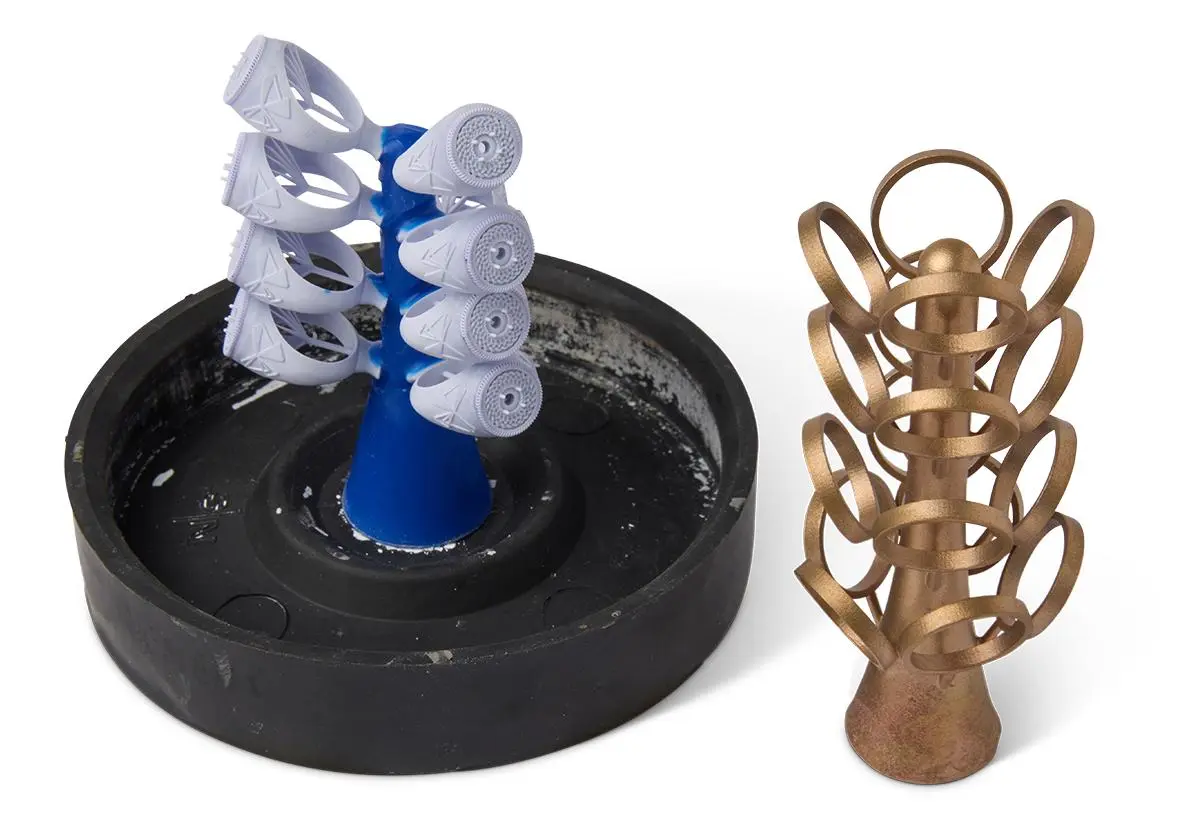
Creating a beautiful jewelry design is only the first step. The model must also print accurately, survive post-processing, and work with the chosen metal casting process.
A design that looks perfect on a computer screen can still fail during printing or casting. Thin walls may break, stone settings may lose detail, and trapped resin can cause problems during burnout.
That is why jewelry design for resin 3D printing requires more than good-looking CAD geometry. Designers must consider how the model will be printed, cleaned, prepared, and eventually cast in metal.
This guide explains the main design rules that help jewelry makers achieve more reliable results.
1. Start With the Final Jewelry Piece in Mind
Before opening CAD software, decide what the finished piece should look like and how it will be manufactured.
A ring, pendant, earring, and detailed bracelet may require different design approaches. Each has different requirements for strength, weight, detail, and casting.
Consider these questions before designing:
- What type of jewelry are you making?
- Which metal will be used for casting?
- Does the design include gemstones?
- Are there thin sections or delicate patterns?
- Will the piece be worn every day?
- Which castable resin and casting process will be used?
These decisions affect the model’s dimensions and structure.
For example, a decorative pendant may allow delicate surface details, while a ring intended for daily wear may need stronger sections around the band and stone settings.
2. Choose Suitable CAD Software
Computer-aided design (CAD) software allows jewelry designers to create accurate three-dimensional models before printing.
Common options include Rhino 3D with jewelry-focused tools, MatrixGold, and other CAD programs designed for product or jewelry modeling.
The right software depends on the complexity of the design and the designer’s experience.
For jewelry work, useful features include:
- Accurate dimension control
- Ring sizing tools
- Stone-setting tools
- Curve and surface modeling
- Pattern duplication
- Wall-thickness checks
- STL or other compatible file export
A clean, well-built model makes the later printing and casting stages easier to manage.
3. Design With Resin Printing in Mind
Resin 3D printers can reproduce fine details, but every design has practical limits.
Extremely thin walls, unsupported features, and tiny decorative elements may break during printing or handling. Features that are too small may also fail to reproduce clearly.
Keep walls and delicate features practical
Wall thickness should match the size of the piece, the resin’s properties, and the requirements of the casting process.
Avoid making every section as thin as possible simply to reduce metal weight. Very thin areas can become fragile, distort during printing, or fail during casting.
Likewise, thick sections may need special attention during casting because they can cool differently from thinner areas.
There is no single wall thickness that works for every jewelry design. Test critical dimensions with the intended resin and casting method.
Check small details
Fine lettering, decorative lines, and intricate textures can make a piece stand out. However, very shallow or narrow features may disappear during printing, finishing, or casting.
Make important details large and deep enough to survive the complete manufacturing process.
4. Design Ring Bands and Stone Settings Carefully
Rings often combine curved surfaces, narrow bands, and small gemstone settings. These features need particular attention.
Ring bands
Check the band’s thickness and width around its entire circumference. A band that becomes too thin in one area may break during handling or produce a weak finished piece.
Use the intended ring size rather than relying on visual estimates.
Stone settings
Prongs, bezels, and stone seats must be designed around the actual gemstone dimensions and the jeweler’s setting method.
Allow for finishing and fitting where necessary. Do not assume that a stone will fit perfectly just because its digital model fits the CAD setting.
For intricate settings, inspect the design closely before printing. Small errors can become more difficult to correct after casting.
5. Avoid Trapped Resin in Hollow Designs
Hollow jewelry designs can reduce material use, but they introduce an important risk: uncured resin can become trapped inside the model.
During burnout, trapped material may create pressure or residue that damages the investment mold.
If a design is hollow, provide suitable drainage and access openings. Place them where they can drain effectively without compromising the appearance or strength of the finished piece.
Check that:
- Liquid resin can escape from internal cavities.
- Cleaning solution can reach the relevant internal surfaces.
- The model does not contain sealed pockets.
- Openings are suitable for the geometry and casting workflow.
For very small pieces, a solid design may sometimes be more practical than a hollow one. The decision should depend on the design and the foundry’s requirements.
6. Make the Model Suitable for Metal Casting
A resin print intended for casting is usually a pattern, not the finished metal product.
The design must account for the steps that follow printing, including investment, burnout, molten metal filling, cooling, and finishing.
Consider metal shrinkage
Metal dimensions can change during casting and cooling. The amount depends on the metal alloy, casting method, and production conditions.
Some workflows require compensation in the original design or casting setup. Confirm the correct allowance with the foundry or casting professional rather than applying one universal shrinkage percentage.
Avoid unnecessarily massive sections
Large solid areas can create casting challenges because metal does not cool uniformly throughout a piece.
Where suitable, use thoughtful transitions between thick and thin sections. The final geometry should still meet the strength and appearance requirements of the jewelry.
Keep the design clean
Check for overlapping surfaces, unintended internal geometry, open edges, and disconnected components.
A model that looks correct on screen may still contain geometry problems that affect slicing or downstream preparation.
7. Export the Model Correctly
After completing the design, export it in a format supported by the slicing software.
STL is commonly used for resin 3D printing. Other formats may be available depending on the CAD program and slicer.
Before exporting, check:
- Correct scale and units
- Closed, printable geometry
- Surface normals
- Intersecting or duplicated surfaces
- Overall dimensions
- Small features that may be lost during mesh conversion
Use an appropriate mesh resolution so curved surfaces remain smooth without creating unnecessarily large files.
After export, open the model in the slicer and inspect it again. This helps catch issues that were not obvious in the CAD workspace.
8. Choose the Right Resin for Jewelry Casting
Not all 3D printing resins are designed for metal casting.
Standard model resin may work well for prototypes, but it should not automatically be used to create patterns for investment casting.
Castable resin for jewelry is formulated for workflows where the printed pattern is removed during burnout. Its performance depends on the resin formulation and the foundry’s process.
MCast offers a jewellery castable resin range, including Retroflow Yellow Green and Onyx Black formulations. Always check the product’s current instructions and compatibility with your printer before use.
When selecting a resin, consider:
- Compatibility with the printer’s wavelength
- Recommended exposure settings
- Required washing and curing procedure
- Burnout schedule
- Investment material compatibility
- Intended metal casting process
Following the material manufacturer’s instructions is essential. A successful print does not guarantee a successful casting if the burnout and investment process are unsuitable.
9. Prepare the Model for Printing
A completed CAD design still needs to be prepared in slicing software.
The slicer converts the model into layers and helps determine its orientation, supports, and print settings.
Choose a suitable orientation
The best orientation depends on the design’s shape and details.
Tilting a model can reduce large cross-sections and help manage peeling forces. However, orientation must also protect delicate features and limit support marks on visible surfaces.
Add supports carefully
Supports hold the model in place during printing. They are especially important for overhangs and sections that begin printing away from the main body.
Place supports on areas that can be cleaned or finished without damaging important details.
For jewelry, support placement requires extra care because small marks may remain visible after casting and polishing.
Check the sliced layers
Preview the model layer by layer before printing.
Look for isolated features, missing sections, unsupported islands, and unexpected gaps. Fixing these issues before printing can save resin and production time.
10. Print, Wash, and Inspect the Pattern
Once the model is prepared, print it using settings appropriate for the selected resin.
After printing, remove the pattern carefully. Delicate prongs, thin bands, and small decorative features can break if handled roughly.
Follow the resin manufacturer’s washing and post-processing instructions. Remove uncured resin thoroughly, including from recessed details and internal cavities.
Do not assume that every castable resin requires the same curing process. Some materials have specific requirements, so follow the recommended procedure for the product being used.
Before sending the pattern for casting, inspect it for:
- Missing details
- Warped sections
- Broken supports or features
- Sticky or contaminated surfaces
- Trapped resin
- Incorrect dimensions
Correcting a defect at this stage is usually easier than discovering it after casting.
11. Match the Printer to the Design
The printer’s resolution, build volume, and consistency can influence the results.
For detailed jewelry models, a printer with a fine pixel size can help reproduce small features. Build volume also matters when printing multiple designs together.
The Nova3D GEM3, for example, has a 17 × 17 μm pixel size and a 154 × 87 × 120 mm build volume. The GEM3 Max offers a larger 211 × 118 × 120 mm build volume and a 14 × 19 μm pixel size.
These specifications can help jewelry businesses compare the detail capability and production space available for their work. Actual results also depend on resin compatibility, exposure settings, model geometry, and post-processing.
Choose a printer based on the details you need to reproduce and the number of models you expect to produce in each batch.
12. Common Jewelry Design Mistakes to Avoid
Even experienced designers can overlook details that affect printing and casting.
Making features too thin: Delicate sections may break or fail to cast properly. Check critical dimensions before printing.
Ignoring drainage: Hollow models without suitable openings may trap resin and cause burnout problems.
Using standard resin for casting: Choose a material intended for the casting workflow.
Placing supports on visible surfaces: Support marks can increase finishing work and damage fine details.
Ignoring scale: Confirm the model’s dimensions after export and in the slicer.
Skipping the layer preview: Unnoticed islands or missing sections can lead to failed prints.
Assuming printing success guarantees casting success: The pattern, resin, investment, burnout, and metal casting process must all work together.
Conclusion
Successful jewelry casting begins long before molten metal enters the mold. It starts with a CAD model designed for the realities of resin printing and the chosen casting process.
By checking wall thickness, stone settings, drainage, geometry, supports, and resin compatibility, designers can reduce common failures and create more reliable patterns.
The best results come from treating design, printing, and casting as connected stages rather than separate tasks. A well-prepared model makes the workflow easier to manage and helps jewelry makers turn digital designs into finished metal pieces with greater confidence.