
How to Reduce Support Marks on Resin 3D Printed Jewelry

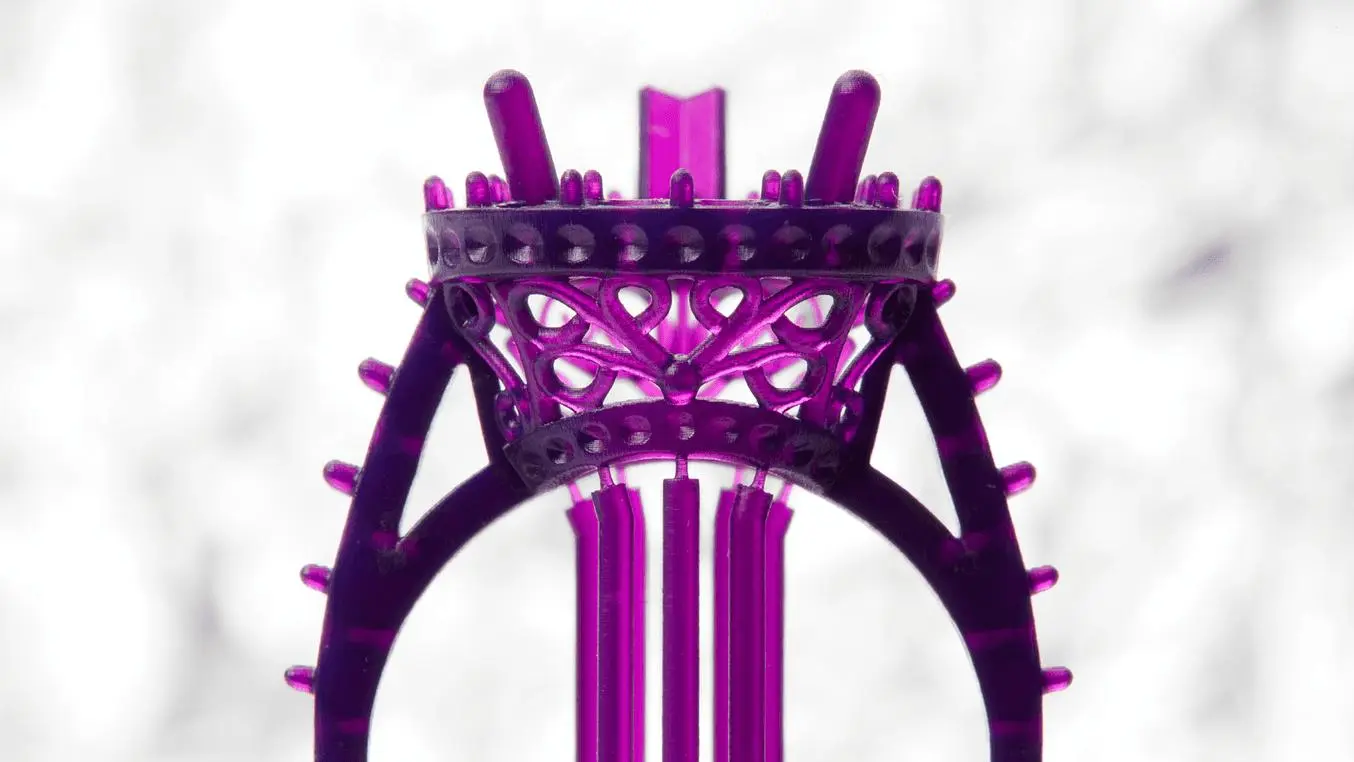
You print a beautiful ring pattern, pull it off the plate, and there they are: tiny bumps and dots where the supports used to be.
Support marks are one of the most common frustrations in resin jewelry printing. They cost you time at the bench, and if you are casting, every mark on the pattern shows up again in the metal.
The good news is that you can reduce them a lot. Most support marks come down to a few simple choices: orientation, support placement, support size, exposure, and how you remove the supports afterwards.
In this guide, you will learn how to reduce support marks on resin 3D printed jewelry, step by step, in plain language.
Why Do Support Marks Happen?
Resin printers build parts layer by layer. Any part of a model that hangs in the air, such as the underside of a ring or a stone seat, needs a support to hold it in place while it prints.
Each support touches the model at a small contact point. When you remove the support, a tiny stub or dent is left behind. That is a support mark.
You cannot remove supports completely, but you can:
- Put the marks in places that do not matter
- Make the marks smaller
- Make them easier to clean up
That is the goal of everything below.
Step 1: Choose the Right Orientation
Orientation is the biggest factor. The direction your piece faces on the build plate decides where supports are needed in the first place.
Avoid Printing Flat
A flat piece sitting directly on the plate has large surfaces facing downward. Those surfaces need heavy support and often come out rough. Flat printing also increases peel force, which raises the chance of failure.
Use a Tilt
Tilting a piece helps in two ways:
- It reduces the area that needs support
- It lets supports touch the model in fewer, smaller places
For many rings and pendants, a tilt of around 30 to 45 degrees is a good starting point. Test with your own designs, because every shape behaves a little differently.
Face the Detail Upward
Surfaces that face down need supports and tend to look worse. Surfaces that face up or sideways usually come out cleaner. Turn your piece so the most important, most visible side faces away from the plate.
Step 2: Place Supports in Hidden Areas
Ask a simple question before every print: “Which side will be polished, set with stones, or seen by the customer?” Keep supports off that side.
Here are some common examples:
- Rings: Support the inside of the shank and the underside of the bezel, not the outer face.
- Pendants: Support the back, not the front.
- Earrings and studs: Support the back or the post area.
- Bracelets and chains: Support the inner surface.
- Stone settings: Keep supports away from seats, prongs, and gallery details.
If you are designing your own models, you can make this even easier by planning the support areas in advance. Our guide on how to design jewelry models for resin 3D printing and metal casting covers this.
Step 3: Use Similar Support Tips
The contact tip is the part of the support that touches your model. A smaller tip leaves a smaller mark.
- Light or small tips work well for delicate, lightweight areas.
- Medium tips suit most general support needs.
- Heavier tips are only needed for large or heavy sections.
Be careful, though. If the tip is too small, the support can snap and the piece can fail. The right size depends on the weight and shape of the area being supported.
A good approach is to test a few sizes on a small sample piece and see which gives clean results without failing.
Step 4: Do Not Over-Support
More supports do not always mean a better print. Too many supports mean more marks and more cleanup.
Instead, aim for the fewest supports that still hold the piece safely.
- Support every island, which is any point that starts printing in mid-air.
- Avoid placing supports where the surface is already well supported by another.
- Remove supports that are very close together and doing the same job.
- Use the slicer’s preview to look for warnings or unsupported areas.
Auto-support is a great starting point, but always check it by eye. Auto tools often put supports in places that suit the printer, not the jeweler.
Step 5: Use a Raft and a Strong Base
A raft is a thin base layer that sits between the build plate and your model. It helps patterns stick evenly and keeps the lower supports strong.
For jewelry, a raft also makes it easier to lift a whole batch off the plate without bending delicate pieces.
Keep the raft sized properly. A raft that is too large wastes resin, and one that is too small may not hold well.
Step 6: Get Your Exposure Settings Right
Exposure affects support marks more than most people realize.
- Over-exposure makes supports thick, hard, and difficult to remove cleanly. It can also cause small blobs at the contact points.
- Under-exposure makes supports weak and brittle. They may snap during printing, which leads to failed pieces.
Start with the resin manufacturer’s recommended settings. Then run an exposure test and fine-tune. Small adjustments often give cleaner support tips and smoother surfaces.
If your prints are failing for reasons you cannot pin down, our guide on why resin 3D prints fail can help you find the cause.
Step 7: Use a Thinner Layer Height and a Good Printer Setup
Fine layers give smoother surfaces and smaller, cleaner contact points. Many jewelers print at fine layer heights to capture small details.
The quality of your printer setup matters too:
- A clean, level build plate
- A healthy release film that is not worn or cloudy
- A clean vat and screen
- Well-mixed resin at a steady temperature
A worn release film or poor leveling can cause failures that look like support problems. Our guide to NFEP film explains when to replace it. If you are choosing a printer for fine work, 8K vs 16K resin printers can help you compare resolution.
Step 8: Remove Supports the Right Way
Even perfect supports leave marks if you remove them badly. A careful removal technique makes a big difference.
Remove Supports at the Right Time
For many resins, supports are easier to remove after washing but before the final cure, while the resin is still a little softer. Fully cured supports are harder and more likely to chip the model.
Check the resin’s instructions, as some resins behave differently.
Use the Right Tools
- Small flush cutters
- Fine tweezers
- A thin hobby blade
- Small files and sanding sticks
Cut, Do Not Pull
Never pull or twist a support off. That can tear a chunk out of the model.
- Hold the piece steady.
- Cut the support a tiny distance away from the model, leaving a small stub.
- Remove the stub carefully with a blade or fine file.
- Finish with gentle sanding.
Start with the thinnest supports and work toward the thickest ones. Take your time with delicate areas like prongs and thin edges.
Keep the Piece Supported
Hold the pattern gently while cutting. Delicate jewelry bends and snaps easily, especially around thin bands and prongs.
Step 9: Clean Up the Marks
Once the supports are off, you can smooth out what is left.
- Sand lightly with fine grit paper or sanding sticks. Work gently and avoid sanding away detail.
- Use a small file on stubborn stubs, especially on flat areas.
- Fill tiny pits with a drop of the same resin, then cure it locally. This works well for small dents.
- Clean the piece to remove dust before the final cure.
For more tips on cleaning and curing patterns properly, read our guide on post-processing castable resin prints.
Step 10: Think About the Casting Stage
If your prints are castable patterns, remember that every mark on the pattern will usually show up in the metal.
- Clean the pattern as well as you reasonably can before casting.
- Check surfaces carefully under good light or a loupe.
- Use a resin that is designed for casting. Our castable resin range is made for clean burnout.
- Follow the resin manufacturer’s burnout schedule.
Some marks are easier to fix on the finished metal than on the pattern. Light marks on flat or easy-to-reach areas can often be polished out later. But marks on fine detail are much better dealt with on the pattern.
For the full process from print to metal, see our jewelry casting workflow with 3D printing.
A Quick Checklist to Reduce Support Marks
Before you print, check these:
- The piece is tilted, not flat
- Visible and detailed surfaces face away from the plate
- Supports are on hidden areas only
- Support tips are as small as is safe
- Every island has a support
- No unnecessary extra supports
- A raft is in place
- Exposure settings are tested
- The printer, vat, and film are in good condition
After printing:
- Wash the piece properly
- Remove supports before the final cure, if your resin allows
- Cut, never pull
- Sand lightly and fill small pits
- Inspect closely before casting
Common Mistakes to Avoid
- Printing flat to “save” on supports
- Letting auto-support place tips on visible surfaces
- Using very heavy support tips on delicate areas
- Over-supporting every little surface
- Over-curing supports before removing them
- Pulling or twisting supports off by hand
- Sanding too hard and losing detail
- Ignoring a worn release film or dirty plate
FAQ
Can I print jewelry with no support marks at all?
Not completely. Almost every resin jewelry print needs supports somewhere. The goal is to move the marks to hidden areas and make them as small as possible.
What is the best to print rings?
Many jewelers start with a tilt of around 30 to 45 degrees. The best angle depends on the design, so run a test print and adjust.
Should I remove support before or after curing?
For many resins, it is easier to remove them after washing but before the final cure. Always check the manufacturer’s guidance for your resin.
Do smaller support tips always give better results?
They leave smaller marks, but if they are too small, the support can snap and the print can fail. Choose a tip size that matches the weight and shape of the area.
How do I fix small pits left by supports?
Fill them with a tiny drop of the same resin, cure it, and sand lightly. For castable patterns, make sure the fix is fully cured before casting.
Do support marks show up after casting?
Yes, in most cases. Marks on the pattern are copied into the metal, so cleaning the pattern properly saves you polishing time later.
Conclusion
Support marks cannot be erased completely, but they can be reduced a lot with a few smart habits.
Start by tilting your pieces and choosing a good orientation. Put supports on hidden areas, use the smallest safe tips, and avoid over-supporting. Get your exposure right, keep your printer in good shape, and remove supports carefully by cutting, not pulling. Finish with light sanding and a close inspection.
Do this consistently and you will spend less time cleaning patterns, get smoother castings, and produce jewelry that looks cleaner straight from the printer.
If you are looking for castable resin, printers, or accessories for your jewelry workshop, explore the full range at MCast 3D.