
How to Prepare Jewelry for Fiber Laser Marking

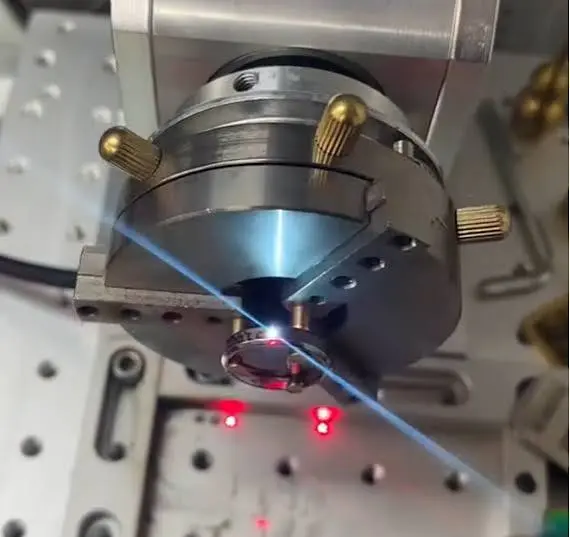
A fiber laser can mark a tiny logo, a purity stamp, or a serial number on a gold ring in seconds. But the result you get depends a lot on what happens before you press start.
Most marking problems, like faint lines, blurry text, uneven depth, or burned spots, do not come from the machine. They come from poor preparation: a dirty surface, a loose piece, the wrong focus height, or no test mark.
The good news is that preparation is simple, and it only takes a few extra minutes. In this guide, you will learn how to prepare jewelry for fiber laser marking, step by step, so your marks come out clean, sharp, and repeatable.
Why Preparation Matters for Laser Marking on Jewelry
Jewelry is small, curved, shiny, and valuable. That combination makes it harder to mark than a flat steel plate.
- Shiny metals reflect laser light. Gold and silver reflect a lot of the laser’s energy, so the surface needs to be clean and the settings need to be right.
- Curved surfaces change the focus. A ring or bangle is not flat, so parts of the mark can be out of focus.
- Pieces are small and easy to move. Even a slight shift during marking can ruin the design.
- Mistakes are costly. A bad mark on a finished piece can mean extra polishing, rework, or a scrapped item.
Good preparation reduces all of these risks.
Step 1: Know Your Metal and Finish
Jewelry is small, curved, shiny, and valuable. That combination makes it harder to mark than a flat steel plate.
- Shiny metals reflect laser light. Gold and silver reflect a lot of the laser’s energy, so the surface needs to be clean and the settings need to be right.
- Curved surfaces change the focus. A ring or bangle is not flat, so parts of the mark can be out of focus.
- Pieces are small and easy to move. Even a slight shift during marking can ruin the design.
- Mistakes are costly. A bad mark on a finished piece can mean extra polishing, rework, or a scrapped item.
Good preparation reduces all of these risks.
Step 1: Know Your Metal and Finish
Before you start, check what the piece is made of and how it is finished. Different metals respond differently to a fiber laser.
- Gold and silver: Very reflective, so they may need careful testing and good surface preparation.
- Platinum and palladium: Strong metals that usually need a test run to find the right settings.
- Brass and copper alloys: Often mark easily and are good for practice.
- Stainless steel and titanium: Mark very well and are often used in watches and accessories.
- Plated pieces: The laser can cut through a thin plating layer and show the metal underneath, so test first.
- Mixed pieces with stones: Take extra care near heat-sensitive materials.
If you are not sure what the piece is made of, do not guess. Ask the maker, check the records, or test on a similar piece first.
Step 2: Clean the Piece Thoroughly
A clean surface gives a clean mark. Oil, dust, and polishing residue can absorb or scatter laser energy and cause uneven marks or smoke stains.
What to Remove
- Fingerprints and skin oils
- Polishing compound and dust
- Grease or wax from casting or setting
- Tape or sticker residue
- Dirt in small grooves
How to Clean
- Wash with warm water and mild soap to remove surface dirt.
- Use an ultrasonic cleaner if you have one, which is excellent for getting into small details.
- Wipe with isopropyl alcohol (IPA) on a lint-free cloth to remove oils.
- Dry completely. Water and cleaning liquid left on the surface can cause uneven marking.
- Handle with clean gloves or tweezers from this point on, so you do not add new fingerprints.
Keep IPA away from heat and open flames, and avoid it on pieces with delicate stones or finishes that could be affected. When in doubt, check first.
Step 3: Choose the Best Marking Area
Where you mark matters as much as how you mark.
Pick a Flat or Gently Curved Area
The flatter the area, the easier it is to keep the whole mark in focus.
- Rings: The inside of the band or a flat shoulder area is usually best.
- Pendants and tags: The back flat surface is ideal.
- Bangles and bracelets: Use the inside surface, or a flat area on the clasp.
- Earrings and studs: Use a flat back plate if one is available.
- Chains: Mark the tag, clasp, or a flat connecting plate.
Keep Away from Weak Spots
- Avoid very thin areas, where the laser can weaken the metal.
- Keep marks away from solder joints, hollow sections, and stone settings.
- Leave a margin from edges so the design does not run off the piece.
Plan the Size of the Mark
Tiny text is possible, but there is a limit. Very small, complex designs on a curved surface are the hardest to do well. Choose simple fonts, clear logos, and designs that fit comfortably in the space.
Step 4: Think About the Finish and the Order of Work
The order in which you do things can change the result.
- Marking before final polishing can remove tiny burrs or edges around the mark, but heavy polishing afterwards may also wear down a shallow mark.
- Marking after final polishing gives a clean, contrasty mark on a smooth surface, but you need to handle the finished piece with care.
- Marking before plating means the mark may be partly covered by the plating layer.
- Marking after plating may cut through the plating and show a different color underneath.
There is no single right answer for every workshop. The best approach is to test your own process on a sample piece and choose what works best for your product.
Step 5: Protect Stones and Delicate Parts
Fiber lasers create heat, and not every material can handle it.
- Diamonds and hard stones usually tolerate nearby marking well, but it is still sensible to keep the laser away from the stone itself.
- Pearls, opals, emeralds, and other soft or treated stones can be damaged by heat, so take extra care or mark before setting.
- Glue-set or resin parts can melt or discolor near the mark.
- Enamel and coatings may be damaged by direct laser contact.
If possible, mark the metal before stones are set. If the stones are already in place, keep the marking area well away from them, use lower power, and test on a similar piece first.
Step 6: Hold the Piece Securely
A piece that moves, even by a fraction of a millimeter, will give a blurry or distorted mark. Good fixturing is one of the most important parts of preparation.
Use a Proper Fixture
A fixture table or jig holds your jewelry in the same position every time. This makes your marks consistent and saves a lot of setup time when you mark many pieces. If you work with jewelry regularly, our fixture table for fiber laser marking machines is a practical way to keep items steady.
Use a Rotary Axis for Rings and Round Items
Marking around a curved surface is difficult with a fixed flat setup. A rotary axis turns the piece as the laser marks, which keeps the surface at the right distance and lets you mark text around a ring or round item.
We offer a 70mm rotary axis and an 80mm rotary axis for this kind of work.
Simple Holding Tips
- Use soft, non-marring holders so the piece does not get scratched.
- Make sure the piece is tight but not squeezed hard enough to bend it.
- Check that the marking area is level and facing the laser.
- Keep the setup the same for repeat jobs so your settings stay accurate.
- Remove anything that could reflect the beam toward you.
Step 7: Set the Correct Focus Distance
Focus is the most common cause of poor marks. If the surface is too high or too low, the laser spot gets larger and weaker.
- Set the height so the surface sits at the lens’s focal distance.
- Use the red guide light, if your machine has one, to check the position.
- Re-check focus whenever you change to a piece with a different height.
- On curved pieces, focus on the center of the marking area.
Your lens also affects this. A shorter focal length lens, such as an F-163 or F-210, gives a smaller, sharper spot, which is ideal for fine jewelry marking, but it is less forgiving about focus height. Our guide on how to choose the right fiber laser marking lens explains how to pick the right one, and you can browse the fiber laser marking machine field lens options here.
Step 8: Prepare Your Design File
Good preparation includes the design, not just the piece.
- Use clean, simple fonts. Thin or decorative fonts can disappear on small pieces.
- Keep a sensible minimum size. Very small text may lose detail, so test the smallest size you plan to use.
- Use vector graphics for logos so lines stay sharp.
- Check the dimensions. Make sure your design fits within the area you chose.
- Align the design using the guide light or preview before you mark.
- Save your settings for each design and metal so you can repeat good results.
Step 9: Always Run a Test Mark First
This is the step many people skip, and the one that saves the most money.
Before marking a finished piece:
- Test on a similar scrap piece, made of the same metal and finish.
- Start with lower power and speed settings recommended for your machine and metal.
- Check the mark under a loupe or magnifier for sharpness and depth.
- Adjust power, speed, and frequency a little at a time.
- Write down the settings that give the best result.
Highly reflective metals can behave differently from one batch to another, so keep notes and test again when you change alloy or finish.
Step 10: Mark, Then Inspect and Clean
When you are ready to mark the real piece:
- Double-check the fixture, focus, and design alignment.
- Make sure the extraction system is running.
- Start the mark and watch for anything unusual.
- After marking, inspect with a loupe.
- Clean away any dust or residue with a soft cloth or in an ultrasonic cleaner.
- If needed, do a light finishing touch, being careful not to remove the mark.
Store each finished piece safely so the marked area does not get scratched.
Laser Safety for Jewelry Marking
Fiber lasers use invisible light that can injure your eyes even when the beam bounces off a shiny surface. Jewelry is very reflective, so safety is especially important.
- Wear laser safety glasses rated for 1064 nm.
- Do not look at the beam or its reflections.
- Use fume extraction when marking metals, plated pieces, or anything with coatings.
- Keep the machine away from children and untrained people.
- Remove loose reflective items from the workspace.
- Follow your machine manufacturer’s safety instructions.
Quick Preparation Checklist
Before marking
- Metal and finish identified
- Piece cleaned and fully dry
- Marking area chosen (flat, away from stones and weak spots)
- Stones and delicate parts protected
- Piece held securely in a fixture or rotary axis
At the machine
- Focus height set correctly
- Design file checked and aligned
- Test mark done on a similar scrap piece
- Settings saved
- Safety glasses on and extraction running
After marking
- Mark checked under magnification
- Piece cleaned
- Finished item stored safely
Common Mistakes to Avoid
- Marking a dirty or oily surface
- Skipping the test mark
- Choosing a curved, uneven area when a flat one is available
- Letting the piece move during marking
- Ignoring the focus height
- Marking too close to stones or solder joints
- Using a design that is too small or too thin
- Forgetting that plating can be cut through
- Not wearing proper laser safety glasses
FAQ
Can a fiber laser mark gold and silver?
Yes, but they are reflective metals, so you need a clean surface, careful focus, and tested settings. Many jewelers use fiber lasers for hallmarks, logos, and serial numbers on gold and silver.
Do I need to clean jewelry before laser marking?
Yes. Oil, dust, and polishing residue can cause uneven or faint marks. A quick wash and an alcohol wipe make a big difference.
Should I mark jewelry before or after polishing?
It depends on your process. Marking after final polishing gives clean, high-contrast marks, but later polishing can wear them down. Test both on a sample to see what suits your pieces.
Can I laser mark jewelry with stones?
Often yes, if you keep the marking area away from the stones and use careful settings. Heat-sensitive stones such as pearls and opals need extra care, or should be marked before setting.
How do I mark a ring properly?
Use a rotary axis to turn the ring so the surface stays at the right distance from the lens, and mark the inside of the band or a flat area. Always run a test first.
What lens is best for jewelry marking?
Shorter focal length lenses, such as F-163 or F-210, give a smaller, sharper spot and are popular for fine detail.
Is laser marking permanent?
It is very durable, but a shallow mark can wear down with heavy polishing or plating. Choose the depth and process that suit your product.
Do I need special safety equipment?
Yes. Wear laser safety glasses rated for 1064 nm and use fume extraction. Never skip these, especially with reflective jewelry.
Conclusion
Great laser marks on jewelry start before the laser turns on.
Identify the metal and finish, clean the piece, pick a flat and safe marking area, protect stones, and hold the piece firmly in a fixture or rotary axis. Set the focus carefully, prepare a clean design, and always run a test mark first. Do this every time and you will get sharper marks, fewer mistakes, and more consistent results.
If you are setting up your workshop, explore our fiber laser marking machines, lenses, rotary axes, and fixture tables at MCast 3D. If you need help choosing the right setup for your jewelry work, contact our team and we will be happy to guide you.