
How to Choose the Right Fiber Laser Marking Lens

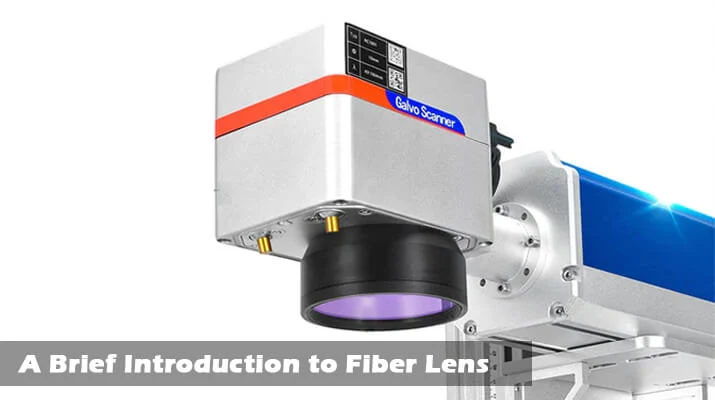
Your fiber laser marking machine can only be as good as the lens in front of it.
Many people spend a lot of time comparing laser power, such as 20W, 30W, or 50W, but forget that the lens decides how that power is used. The same laser can make razor-sharp text on a gold ring with one lens, and a faint, blurry mark with another.
If you have ever wondered why your engraving looks too small, too big, too shallow, or slightly out of focus, the lens is often the answer.
In this guide, you will learn how to choose the right fiber laser marking lens for your machine and your work. We will explain what a field lens does, what the focal length numbers mean, and how to match a lens to jewelry, metal tools, plastics, and more, all in plain language.
What Is a Fiber Laser Marking Lens?
A fiber laser marking machine creates a very narrow beam of infrared light. That beam passes through a set of mirrors, called a galvo scanner, which move it quickly to draw your design. The last part the beam passes through before reaching your material is the field lens, also called an F-theta lens or scan lens.
The field lens does two important jobs:
- It focuses the beam into a tiny, powerful spot on your workpiece.
- It keeps the beam flat across the marking area, so the spot stays sharp in the corners as well as the center.
Without a proper field lens, the marks would look sharp in the middle and blurry at the edges.
What Do The Lens Numbers Mean? (F-163, F-210, F-330, F-420)
When you shop for lenses, you will see names like F-163 or F-210. The number after the “F” is the focal length in millimeters. It decides two things: how big your marking area can be, and how small the laser spot is.
Here are the common sizes:
| Lens | Marking area | Best for |
|---|---|---|
| F-163 | 110 x 110 mm | Fine detail, small items |
| F-210 | 150 x 150 mm | Everyday all-round marking |
| F-330 | 220 x 220 mm | Larger parts and bigger designs |
| F-420 | 300 x 300 mm | Large items and uneven surfaces |
These are the sizes available in our fiber laser marking machine field lens range at MCast.
The trade-off is simple:
- Shorter focal length means a smaller marking area, but a smaller, sharper spot.
- Longer focal length means a bigger marking area, but a larger spot.
You cannot get everything from one lens, so choosing the right one is about deciding what matters most for your work.
Spot Size, Power, and Detail: Why They Are Connected
Think of a magnifying glass focusing sunlight. A tighter focus makes a hotter, sharper dot. Laser lenses work the same way.
Small focal length (like F-163):
- Tiny focus spot
- High energy concentration
- Sharp, fine lines and small text
- Deeper marks with the same laser power
- Smaller working area
Large focal length (like F-330 or F-420):
- Larger focus spot
- Energy spread over a wider point
- Wider marking area
- Longer depth of field, so uneven surfaces stay in focus
- Marks may be lighter or slower unless you adjust settings
This is why choosing a large lens just to “have more space” can lead to disappointment. A bigger area comes with a bigger spot, so fine details can suffer.
Understanding Depth of Field
Depth of field is how far above or below the perfect focus point your material can be while the mark still looks sharp.
- Short focal length lenses have a small depth of field. The surface must be at exactly the right height. Even a slight height difference can blur the mark.
- Long focal length lenses have a larger depth of field. They are more forgiving on curved, bumpy, or uneven items.
This matters a lot in real work. A flat metal plate is easy for any lens. A cylinder, a curved ring, or a tool with a stepped surface is much easier with a longer lens.
Which Lens is Best for Your Application?
Here is a practical guide based on common uses.
Jewelry and Small Precision Items
Gold rings, pendants, bangles, and hallmarks need clean, tiny, detailed marks.
- Recommended: F-163 or F-210
- Why: A small spot gives sharp text, logos, and serial numbers, even on a small area.
- Good to know: Jewelry surfaces are often curved, so you will need accurate focusing. A rotary attachment can help on rings and round items.
Medical Tools, Electronics, and Small Metal Parts
These items often need very small codes, micro text, and barcodes.
- Recommended: F-163 or F-210
- Why: High energy density and a small spot create crisp, readable marks.
General Metal Marking: Tools, Hardware, and Name Plates
If you mark a mix of items such as tool handles, name plates, and tags, you want flexibility.
- Recommended: F-210
- Why: It offers a good balance of area and detail. Many workshops find it the most useful all-round lens.
Larger Parts, Auto Parts, and Bigger Designs
If your items are bigger or you want to mark several pieces in one go, you need more area.
- Recommended: F-330 or F-420
- Why: The larger field lets you mark big items or lay out multiple items in a single pass.
Uneven or Rough Surfaces
Casting surfaces, rough metal, and stepped parts are hard to keep in perfect focus.
- Recommended: F-330 or F-420
- Why: A longer depth of field keeps the mark clearer across height changes.
Plastics and Wood
These materials mark differently from metal, and a bigger lens can be useful for larger pieces.
- Recommended: F-210 for general work, F-330 or F-420 for larger items
- Why: The right lens depends mostly on item size and the detail you need. Always test settings on a sample first.
Quick Decision Guide
Ask yourself these four questions.
1. How big are my items?
- Smaller than about 100 mm: F-163
- Up to about 150 mm: F-210
- Up to about 220 mm: F-330
- Up to about 300 mm: F-420
2. How fine does my detail need to be?
- Very fine text, micro codes, and logos: choose a shorter lens
- Normal text and logos: F-210 is usually enough
- Large simple marks: a longer lens works well
3. Are my surfaces flat or uneven?
- Flat: any lens works
- Slightly uneven or curved: choose a longer lens
4. How much laser power do I have?
- Lower power (like 20W or 30W) benefits from a smaller spot, which concentrates the energy
- Higher power (like 50W) can handle larger lenses more comfortably
If you are unsure, the F-210 is a safe, versatile starting point. You can always add a second lens later if your work changes.
Does Laser Power Change Which Lens You Need?
Yes, it plays a part. A bigger lens spreads the laser energy over a larger spot, so marking can be lighter or slower with a lower-power machine.
- With a 30W laser, a shorter lens such as F-163 or F-210 usually gives stronger, deeper marks.
- With a 50W laser, you have more power to spare, so longer lenses like F-330 or F-420 work well for larger areas.
If you are choosing a machine as well, take a look at our Raycus fiber laser marking machines, available in 30W and 50W versions, in table and portable styles.
Check Compatibility Before You Buy
A lens that does not fit or match your machine is a waste of money. Check these points:
- Wavelength: Fiber lasers work at 1064 nm, so the lens must be made for this wavelength. Our lenses are designed for standard 1064 nm fiber laser marking machines.
- Thread and mount size: The lens must screw into your scan head properly. Check your machine’s manual or measure the thread.
- Lens type: You need an F-theta lens made for galvo scanners, not a regular camera or magnifying lens.
- Machine compatibility: Make sure your marking head and software support changing the field size.
- Beam expander: On some machines, the beam expander and lens work together. If you are unsure, ask your supplier.
When in doubt, send us your machine model and a photo of the lens mount, and our team can help you choose the right one.
What to Look for in a Good Lens
Not all lenses are equal. Quality affects both mark quality and how long the lens lasts.
- Anti-reflection coating for 1064 nm. A good coating lets more laser energy through. Our field lens has a special coating with high transmittance, so less energy is lost and you can mark deeper using less power.
- Sealed, dust-resistant body. Dust is a major enemy of laser optics. A well-sealed lens body keeps the internal optics clean.
- Strong metal housing. An aluminum alloy body with a good surface treatment holds its shape and resists wear.
- Even focus across the field. A quality F-theta lens keeps the corners as sharp as the center.
A cheap, poor-quality lens can cause uneven marks, burned spots, and early damage, which costs far more in the long run.
How to Set Up a New Lens
Once you have the right lens, installing it properly makes a big difference.
- Turn off and unplug the machine. Never change optics while the machine is on.
- Unscrew the old lens gently. Hold it by the metal body, not the glass.
- Screw in the new lens carefully and make sure it is seated straight.
- Update the field size in your marking software to match the new lens, for example 110 x 110 mm for an F-163.
- Set the correct focus distance. Each lens has a different working distance. Raise or lower the head until the surface sits at the focal point.
- Run a test mark on scrap material and check for sharpness at the center and the corners.
- Adjust power, speed, and frequency for the new spot size.
If the marked square does not match the field size in the software, you may need to calibrate the field. Most marking software has a correction tool for this.
How to Look After Your Lens
A good lens can last a long time with simple care.
- Keep the lens covered when the machine is not in use.
- Keep the workspace clean. Marking creates dust and smoke, so use fume extraction.
- Clean only when needed, using lens-safe tissue and a suitable cleaning liquid. Do not wipe a dry, dusty lens, because that can scratch the coating.
- Never touch the glass with your fingers.
- Avoid knocking the scan head or letting the lens hit the workpiece.
- Check for burn marks or cloudy spots, and replace the lens if damage appears.
Laser Safety: Do Not Skip This
Fiber lasers are powerful and invisible to the eye. A reflected beam can still cause serious eye injury.
- Wear laser safety glasses rated for 1064 nm.
- Keep reflective items away from the beam path.
- Do not look into the beam, even through a lens.
- Keep the machine in an area where children and untrained people cannot reach it.
- Use fume extraction when marking plastics and coated metals.
Always follow the safety guidelines from your machine’s manufacturer.
Common Mistakes When Choosing a Lens
- Choosing the biggest lens “just in case” and losing fine detail
- Choosing a very small lens for items that are uneven or curved
- Forgetting to update the field size in the software
- Ignoring the working distance and focusing badly
- Buying a lens that does not match the machine’s thread or wavelength
- Using a low-power laser with a large lens and expecting deep marks
- Cleaning the lens roughly or too often
- Buying the cheapest lens without checking quality or coating
FAQ
What does F-210 mean on a laser lens?
The number is the focal length in millimeters. An F-210 lens has a 210 mm focal length and typically gives a marking area of about 150 x 150 mm.
Which lens is best for jewelry marking?
F-163 and F-210 are the most popular choices. Both give a small, sharp spot for fine text, logos, and hallmarks.
Can I use a larger lens to mark more items at once?
Yes. A longer focal length gives a larger marking area. Keep in mind that the spot size gets bigger too, so detail and depth may be reduced.
Will a different lens make my laser stronger?
Not stronger, but a smaller focal length concentrates the same power into a smaller spot, which can make the marking deeper and sharper.
Do I need to change software settings after changing the lens?
Yes. Update the field size and adjust the focus distance. You may also need to change power, speed, and frequency.
Can I use one lens for everything?
Many people do. An F-210 is a good all-round lens. If you do very fine work or large work often, a second lens makes things easier.
How often should I replace a laser lens?
There is no fixed time. With careful use and clean conditions, a lens can last a long time. Replace it if you notice burn marks, a cloudy coating, or marks that are getting weaker or uneven.
Is a fiber laser lens the same as a CO2 laser lens?
No. Fiber lasers work at 1064 nm, and CO2 lasers work at a much longer wavelength, so their lenses are made differently. Never mix them.
Conclusion
Choosing the right fiber laser marking lens is mostly about balance.
A shorter focal length gives you finer detail and a stronger mark in a smaller area. A longer focal length gives you more space and better tolerance for uneven surfaces, at the cost of a bigger spot. Match the lens to your items, your detail level, your surfaces, and your laser power, and always check compatibility before you buy.
If you are not sure where to start, the F-210 is a safe, versatile choice for most workshops, and the F-163 is ideal for jewelry and fine detail.
You can explore our complete range of fiber laser marking machine field lenses, machines, rotary axes, and fixture tables in our laser machines category at MCast 3D. If you need help choosing, contact our team and we will guide you to the right lens for your work.