
8K vs 16K Resin 3D Printers: Does Higher Resolution Really Matter?

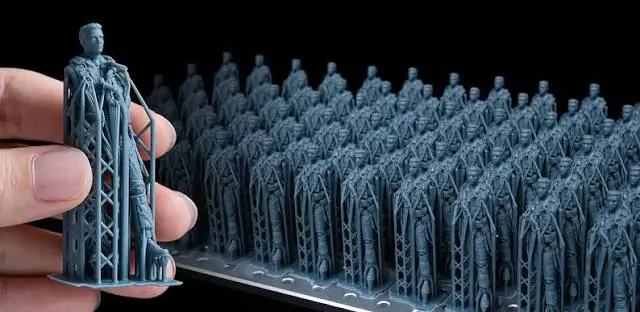
When shopping for a resin 3D printer, resolution is one of the first specifications people notice.
8K sounds better than 4K. 16K sounds better than 8K. But does a higher resolution always produce better prints?
Not necessarily.
The number printed on the box is only one part of the picture. Pixel size, build area, optical quality, layer height, resin, exposure settings, and model design all affect the final result.
So, when comparing an 8K vs 16K resin 3D printer, the better question is not simply which one has more pixels. The real question is whether the higher resolution provides a noticeable benefit for the type of work you do.
What Does 8K or 16K Mean in a Resin 3D Printer?
The terms 8K and 16K refer to the resolution of the printer’s LCD screen.
A higher resolution means the screen contains more pixels. More pixels can allow the printer to create smaller individual pixels across the build area.
However, screen resolution and actual print detail are not exactly the same thing.
A large 16K screen may have a similar pixel size to a smaller 8K screen. This is why looking only at the K-number can be misleading.
For resin printing, XY resolution or pixel size is often a more useful specification when comparing fine detail.
What Is an 8K Resin 3D Printer?
An 8K resin 3D printer can produce highly detailed models and is already capable of excellent surface quality.
For many applications, 8K provides more than enough detail.
The Phrozen Sonic Mega 8K S, for example, uses an 8K monochrome LCD with a 43 μm XY resolution. Its large 330 × 185 × 300 mm build volume is designed for producing large models or multiple parts in one print.
This shows why resolution should always be considered alongside build size.
An 8K printer with a large build area can still produce very useful and detailed prints.
What Is a 16K Resin 3D Printer?
A 16K resin 3D printer uses a much higher-resolution LCD to provide a greater number of pixels across the screen.
The advantage becomes more meaningful when the printer also has a small pixel size and a suitable optical system.
The Nova3D Whale4 Ultra 16K uses a 15120 × 6230 LCD resolution and a 14 × 19 μm XY resolution. It also provides a 211.68 × 118.37 × 220 mm build volume.
The important point is that the 16K specification is useful because it is combined with a relatively fine pixel size.
8K vs 16K: What Is the Real Difference?
The biggest difference is the amount of detail the printer can potentially reproduce.
A 16K printer can be particularly useful for models containing:
- Very small text
- Fine patterns
- Sharp edges
- Intricate textures
- Small openings
- Detailed jewelry designs
- Complex miniature surfaces
But the improvement is not always obvious.
If the model itself does not contain very fine details, moving from 8K to 16K may not make a dramatic visual difference.
Pixel Size Matters More Than the K Number
This is one of the most important things to understand when comparing resin 3D printers.
Imagine two printers:
Printer A
- 8K resolution
- 43 μm pixel size
Printer B
- 16K resolution
- 19 μm pixel size
Printer B has a clear advantage for very fine details.
But if another 16K printer has a much larger screen and a larger pixel size, the difference may not be as significant as the 16K label suggests.
That is why experienced buyers should look at XY resolution in microns, not just 8K or 16K.
Does 16K Make Prints Twice as Detailed?
No.
This is a common misunderstanding.
A 16K printer does not automatically produce a print that looks twice as detailed as an 8K printer.
The K-number describes the LCD’s pixel count. Actual detail depends on several factors working together.
These include:
- Pixel size
- Optical quality
- Light uniformity
- Layer height
- Resin properties
- Exposure settings
- Model geometry
- Printer stability
- Slicer settings
A well-designed 8K printer can produce excellent results, while a poorly optimized high-resolution printer may not deliver the expected improvement.
Where 16K Can Make a Difference
There are applications where higher resolution becomes more useful.
Jewelry 3D Printing
Jewelry designs often contain very small features.
Fine lettering, filigree, sharp edges, stone settings, and delicate textures can benefit from a printer capable of reproducing smaller details.
The Nova3D GEM3 is a good example of why pixel size matters. Although its resolution is listed as 9072 × 5120, its pixel size is 17 × 17 μm. It is designed specifically for detailed applications such as jewelry and dental models.
This is an important lesson:
A printer does not need a “16K” label to provide excellent fine-detail performance.
Miniatures and Detailed Models
Small models can also benefit from finer XY resolution.
Tiny facial features, textures, clothing patterns, and sharp edges can become cleaner when the printer can reproduce smaller pixels.
Precision Prototyping
For prototypes containing small mechanical features, fine text, or detailed surfaces, higher resolution can provide an advantage.
However, dimensional accuracy also depends on the printer’s mechanics, resin behavior, calibration, and model design.
When 8K Is Already Enough
An 8K resin printer can be a strong choice for:
- Large prototypes
- Miniatures
- Figurines
- Product models
- Engineering prototypes
- General-purpose resin printing
- Multiple parts per build
The Phrozen Sonic Mega 8K S is a good example. Its large build volume allows users to produce many models in one print, making build capacity an important part of its value.
If your models do not contain extremely small features, increasing resolution may not provide enough visible improvement to justify choosing a printer based on resolution alone.
8K vs 16K for Jewelry
Jewelry is one area where the comparison becomes more interesting.
A jewelry model can contain details that are difficult to reproduce accurately with a lower-resolution printer.
For this type of work, look beyond the K rating.
Consider:
- XY pixel size
- Surface quality
- Light uniformity
- Dimensional accuracy
- Build area
- Resin compatibility
- Support performance
- Casting requirements
The Nova3D GEM3, for example, has a 17 × 17 μm pixel size and supports layer thicknesses from 20 to 200 μm.
The GEM3 Max goes further with a 14 × 19 μm pixel size and a larger 211 × 118 × 120 mm build area. This gives jewelry businesses more space for arranging multiple models in a print.
For jewelry production, these specifications can be more meaningful than simply asking whether a printer is 8K or 16K.
Does Higher Resolution Affect Printing Speed?
Not necessarily.
Print speed is influenced by several factors, including:
- Layer height
- Exposure time
- Resin
- Printer hardware
- Model height
- Lift settings
- Slicer settings
A higher-resolution printer can still print efficiently.
For example, the Nova3D Whale4 Ultra 16K is rated for printing speeds up to 100 mm/h according to its product specifications.
Therefore, higher resolution should not automatically be considered a trade-off for slower printing.
Build Size Can Be More Important Than Resolution
This is another factor buyers often overlook.
A printer with a larger build area can produce more parts in one job.
For a business, this can matter more than having an extremely high pixel count.
Consider two printers:
Printer A: extremely high resolution but a small build area.
Printer B: slightly lower resolution but a much larger build area.
If the business regularly prints 20 models at once, Printer B may be more useful.
This is especially important for production environments where efficiency matters alongside detail.
Resin Also Affects the Final Result
The printer is only one part of the printing system.
The resin can influence:
- Surface finish
- Sharpness
- Strength
- Flexibility
- Dimensional behavior
- Post-processing
- Casting performance
A high-resolution printer cannot compensate for a resin that is unsuitable for the application.
For jewelry casting, for example, the resin needs to be appropriate for the intended investment casting workflow. Printer settings should also be calibrated for the selected material.
Layer Height Is Different From Resolution
These two specifications are often confused.
XY resolution describes how finely the printer can position details across the X and Y axes.
Layer height describes the thickness of each printed layer along the Z axis.
A printer can have very fine XY resolution while using a relatively thick layer height.
For smoother vertical surfaces, reducing layer height can help. But smaller layers also increase the number of layers required for the same model height.
The best settings depend on the model and the desired balance between detail and printing time.
8K vs 16K: Which One Should You Choose?
There is no single answer for everyone.
Choose 8K if:
- You want excellent detail without chasing specifications
- You print larger models
- You need a large build area
- You produce multiple parts per job
- Your models do not contain extremely fine features
- Production capacity is more important than maximum resolution
Choose 16K if:
- You regularly print highly detailed models
- Very small features are important
- You work with intricate jewelry designs
- Fine surface detail is a major priority
- The printer also offers a genuinely small pixel size
- Your workflow can benefit from the additional resolution
What Should You Look At Besides Resolution?
Before buying a resin 3D printer, compare these specifications:
1. XY Resolution
Look at the pixel size in microns.
Smaller values generally allow finer XY detail.
2. Build Volume
Consider how many models you need to print at once.
A larger build area can significantly improve production efficiency.
3. Light Uniformity
Consistent UV exposure across the build area helps maintain consistent results.
4. Motion System
Stable Z-axis movement contributes to consistent layer positioning.
5. Resin Compatibility
Make sure the printer works well with the type of resin required for your application.
6. Software and Settings
A good slicer and reliable exposure profiles can make a major difference in everyday printing.
The Bottom Line: Does 16K Really Matter?
Yes, but not for everyone.
A higher-resolution resin 3D printer can provide an advantage when you are printing models with extremely fine details. However, the difference between 8K and 16K is not automatically visible on every model.
For most buyers, the better approach is to look at the entire printing system.
Pixel size, build volume, optical quality, resin, layer height, and printer stability all contribute to the final result.
For detailed professional work, a high-resolution printer such as the Nova3D GEM3 or GEM3 Max may be more relevant than simply choosing the printer with the largest K number. For users who need a large production area, an 8K machine such as the Phrozen Sonic Mega 8K S can offer a different advantage through its large build volume.
So, when comparing 8K vs 16K resin 3D printers, don’t buy the biggest number on the specification sheet.
Buy the printer that matches your models, materials, production volume, and required level of detail.
Conclusion
The move from 8K to 16K can provide real benefits, but resolution is not the only measure of a good resin 3D printer.
For detailed jewelry, miniatures, prototypes, and other precision applications, pixel size and optical performance can matter more than the headline K rating.
At the same time, a large build area can be more valuable for businesses producing multiple models at once.
The best high-resolution resin 3D printer is therefore not necessarily the one with the highest resolution. It is the one that provides the right combination of detail, build size, reliability, resin compatibility, and production efficiency for your work.