
Can Resin 3D Printing Produce Transparent Parts?

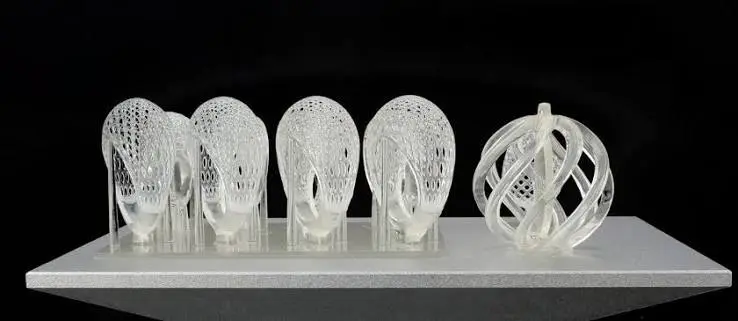
Resin 3D printing is famous for smooth, detailed parts. So it is natural to wonder: can it also make parts you can see through?
The short answer is yes, but with some honest limits. Resin printers can produce clear and transparent parts, and many people use them for light covers, display pieces, prototypes, and models with see-through windows. But a freshly printed clear part is rarely as clear as glass. It usually looks slightly cloudy, yellowish, or full of tiny layer lines.
The good news is that with the right resin, print settings, and finishing steps, you can get surprisingly clear results. In this guide, you will learn whether resin 3D printing can produce transparent parts, why prints look cloudy at first, how to make them clearer step by step, and when it is better to use another method. Everything is explained in simple language.
Why Resin Is Better for Transparency Than Other 3D Printing Methods
Most home 3D printers use filament, which melts plastic and lays it down in thick lines. Even with clear filament, the result is usually cloudy because of the layers, tiny air gaps, and the way the plastic cools.
Resin printing works differently:
- Liquid resin is cured by UV light, layer by layer.
- Layers are very thin, often just a few hundredths of a millimeter.
- The layers bond into a nearly solid block, with very few air gaps.
- The surface is smooth, which is easier to polish.
This is why resin is the best common option for transparent 3D printed parts. It starts with a clear liquid and ends with a mostly solid, polishable plastic.
What Does “Clear” Really Mean?
When you buy clear resin, the word “clear” can mean different things. It helps to know the difference.
- Transparent: You can see through the part clearly, like glass.
- Translucent: Light passes through, but the view is blurry or frosted.
- Clear resin: A resin that cures without added color. The finished part may be transparent or translucent, depending on how you print and finish it.
- Water-clear or high-clarity resin: A resin designed to give a very clear result after finishing.
A freshly printed part is usually translucent, not fully transparent. The surface is slightly rough, and tiny layer lines scatter light. Finishing is what turns a translucent part into a transparent one.
Why 3D Printed Resin Parts Look Cloudy at First
Understanding the cause helps you fix it. Here are the main reasons a clear print looks cloudy.
- Layer lines. Each tiny step between layers scatters light, creating a frosted look.
- Surface texture. A slightly rough surface bends light in many directions.
- Support marks. Spots where supports touched the part look rough and cloudy.
- Tiny bubbles. Air trapped in the resin during printing or mixing can create small bubbles inside the part.
- Uncleaned residue. Leftover liquid resin or dirty wash liquid leaves a hazy film.
- Over-curing. Too much UV exposure can add a yellow tint and make parts brittle.
- Resin color. Some “clear” resins have a slight natural tint.
- Thickness. The thicker the part, the more light is absorbed and the more any tint shows.
Most of these problems can be improved, though not always completely removed.
Step-by-Step: How to Get Clearer Resin Prints
Clear parts are made in three stages: choosing materials, printing well, and finishing carefully. Skipping any stage makes it harder to reach good clarity.
Stage 1: Choose the Right Resin and Printer Setup
Pick a Resin Made for Clarity
Not all clear resins are equal. Look for:
- A resin described as clear, transparent, or water-clear
- Good reviews from users who have printed clear parts
- A data sheet that mentions clarity or low yellowing
- Compatibility with your printer’s light source
Different clear resins behave differently. Some are easy to polish, some are softer, and some yellow faster over time.
Keep the Printer in Good Condition
A healthy printer gives smoother surfaces, which means clearer parts.
- Clean the vat and make sure there are no cured bits floating in the resin.
- Check the release film. A scratched or cloudy film can transfer marks to your parts. Our guide on NFEP film explains when to replace it, and our article on how to remove cured resin from an FEP film helps you clean it safely.
- Level the build plate carefully.
- Check the screen. An aging screen can reduce sharpness. See our guide on when to replace a resin printer’s LCD screen.
- Filter the resin before printing to remove tiny cured particles.
Consider Printer Resolution
Higher resolution means smaller pixels and smoother surfaces, which helps with clarity. But remember that pixel size matters more than the “K” label. Our guide on how to compare resin 3D printers by build volume and XY resolution and our comparison of 8K vs 16K resin 3D printers explain this in detail.
Mix Gently and Avoid Bubbles
Bubbles show up clearly in transparent parts.
- Stir or shake the resin gently, then let it rest so bubbles can rise.
- Do not pour resin from a great height into the vat.
- Remove any visible bubbles on the surface before printing.
- Keep the resin at a steady, comfortable temperature.
Stage 2: Print Settings That Help Clarity
Use Thin Layers
Thinner layers create smaller steps, which means fewer visible lines and easier polishing. Many people use fine layer heights for clear parts, even though the print takes longer.
Get the Exposure Right
Exposure is a balance.
- Too little exposure leaves weak, soft, or sticky layers that can look hazy.
- Too much exposure over-cures the resin, which can add a yellow tint, bleed light, and blur small details.
Start with the manufacturer’s recommended settings and run an exposure test. Clear resin often needs different settings from colored resin.
Choose a Smart Orientation
How you place the part on the build plate affects its clarity.
- Tilt the part so the clear surfaces face away from the plate and from supports.
- Avoid placing supports on the faces that must stay clear.
- Consider whether you want the clearest view through the part’s thickness or through a specific window, and orient it so layers run in a helpful direction.
- Avoid large flat surfaces facing downward, which show support marks.
Use Supports Carefully
Supports leave marks where they touch the part, and in a clear part those marks are very visible.
- Use small contact points.
- Place supports on non-critical surfaces.
- Use enough supports to avoid failed prints, but not more than needed.
- Plan for extra sanding where supports touched.
Our guide on how to reduce support marks on resin 3D printed jewelry shares support techniques that work for any fine, detailed part.
Keep the Part Thin Where Possible
Thin walls look clearer than thick ones, because light passes through less material. If your design allows, keep clear sections as thin as practical.
Stage 3: Finishing, Where the Magic Happens
This is the most important stage. A well-finished part can look dramatically clearer than the same part fresh off the printer.
Step 1: Wash Thoroughly
Remove uncured resin from the surface.
- Wash the part in clean isopropyl alcohol (IPA) or the cleaning liquid recommended by the manufacturer.
- Use fresh or very clean IPA for the final rinse, since dirty IPA leaves a hazy film.
- Do not soak for too long, which can weaken or fog some resins.
- Dry the part completely before curing.
Step 2: Remove Supports Carefully
Cut supports close to the part, and use a fine file or blade to smooth the stubs. Work gently so you do not chip or crack the clear material.
Step 3: Cure Correctly
Curing hardens the part, but over-curing can cause yellowing and brittleness.
- Follow the manufacturer’s recommended cure time.
- Do not leave clear parts under UV for much longer than needed.
- Some people cure under water or in a covered dish to reduce surface tackiness. If you try this, follow instructions from your resin supplier.
Step 4: Sand Progressively
Sanding removes layer lines and support marks. The key is to go through many stages of finer sandpaper without skipping grits.
- Start with a coarser grit, such as 400, to remove layer lines and support marks.
- Move up through finer grits, such as 600, 800, 1000, 1500, and 2000.
- Use wet sanding with water, which reduces dust and gives a smoother surface.
- Sand in even, circular or crossing motions, and rinse often.
- After each grit, the surface should look uniformly scratched before you move to the next one.
Remember that the part will look frosty and cloudy during sanding. This is normal. The clarity comes back in the next steps.
Step 5: Polish
After the finest sandpaper, polishing brings back shine and clarity.
- Use a plastic polish or fine polishing compound on a soft cloth.
- Polish with gentle, steady pressure until the surface becomes glossy and clear.
- A soft buffing wheel or polishing pad can speed things up, but take care not to overheat the part.
Step 6: Add a Clear Coating (Optional but Powerful)
A thin clear coat can fill microscopic scratches and make a part look glass-like.
There are two common options:
- Clear UV resin coating. Brush or dip a thin layer of the same clear resin, let it level out, then cure it. This fills fine scratches and gives a smooth finish.
- Clear spray coat. A clear acrylic or similar spray, applied in thin, even layers, can give a glossy, clear finish.
Test on a spare part first. Coatings can run, pool, or leave bubbles if applied too thickly. Make sure any coating is suitable for your intended use.
How Clear Can Resin Parts Get?
Here is a realistic picture.
- Straight from the printer: Translucent, slightly frosty, with visible layer lines.
- After washing and curing: Clearer, but still not fully transparent.
- After progressive sanding: Cloudy and frosted, but smooth.
- After polishing or clear coating: Often very clear, with a glossy, see-through finish.
With care, many people reach a level of clarity that is great for light covers, display parts, windows, models, and prototypes. However, resin printed parts are generally not a replacement for optical-grade glass or acrylic, especially where perfect clarity or exact optical performance matters.
Common Problems and How to Fix Them
The Part Is Cloudy or Frosty
- Sand through the full range of grits, then polish
- Wash again with clean IPA
- Check for layer lines you missed
- Apply a clear coating
The Part Has a Yellow Tint
- Reduce curing time
- Use a resin with better color stability
- Keep parts thinner
- Store parts away from strong light and heat
Some yellowing is natural with many resins, and it can increase over time with sunlight.
There Are Bubbles Inside the Part
- Let resin rest after mixing
- Pour slowly and avoid shaking right before printing
- Remove bubbles from the surface before printing
- Keep the printing area at a steady temperature
Bubbles that are already inside a cured part cannot be removed, so prevention is the best approach.
Layer Lines Are Still Visible
- Use thinner layers
- Sand longer at each grit
- Change the part’s orientation to hide layers
- Use a clear coating to fill fine lines
Support Marks Are Very Noticeable
- Move supports to non-critical surfaces
- Use smaller contact points
- Sand and polish more carefully in those areas
The Surface Is Sticky or Tacky
- Wash again with clean IPA
- Cure for the recommended time
- Check your exposure settings
- Make sure the resin is mixed and warmed properly
That Part Cracks During Sanding
- Use a gentler touch and wet sanding
- Avoid over-curing
- Consider a tougher resin type if the part needs flexibility
If you also need strength, our guide on the difference between tough resin and ABS-like resin explains how tougher engineering resins compare. Keep in mind that tough resins are not always as clear as dedicated clear resins.
What Are Transparent Resin Parts Used For?
Transparent resin prints are useful in many areas.
- Light covers and diffusers for lamps and LED projects
- Display models and architectural models with see-through parts
- Product prototypes with windows, lenses, or covers
- Fluid-related models that show how liquid moves, for demonstration purposes
- Light pipes and guides for small electronic devices
- Educational models where the inside needs to be visible
- Decorative objects and art pieces
- Fit checks for assemblies that include clear parts
If you are comparing resin printing with other prototyping options, our guide on resin 3D printing for product prototypes vs. CNC or molding can help you decide.
When Resin Is Not the Best Choice for Transparent Parts
Be honest about the limits. Consider other methods if:
- You need true optical quality, such as for lenses, precision light paths, or sensors
- You need perfect, glass-like clarity with no tint at all
- The part will sit in strong sunlight for years, since many resins yellow over time
- The part must resist high heat or harsh chemicals
- You need a very large clear part, because resin printers have limited size
- The part will carry heavy loads or take hard impacts
In these cases, options such as machined clear acrylic, polycarbonate, cast clear urethane, or glass may be better suited.
Safety Reminder
Clear resin is still liquid resin, and it needs careful handling.
- Wear nitrile gloves and eye protection.
- Work in a well-ventilated space.
- Wear a dust mask or respirator when sanding, especially dry sanding, to avoid breathing in dust. Wet sanding reduces dust.
- Store resin in sealed bottles, away from sunlight and children.
- Cure leftover resin and contaminated items before disposal.
- Never pour liquid resin or dirty IPA down the drain.
Our guide on resin 3D printing safety covers ventilation, gloves, storage, and waste disposal in detail.
Common Mistakes to Avoid
- Expecting glass-like clarity straight from the printer
- Using colored or non-clear resin and expecting transparency
- Skipping steps in the sanding sequence
- Washing with dirty IPA
- Over-curing and yellowing the part
- Putting supports on the clearest surfaces
- Printing thick parts and expecting perfect clarity
- Ignoring bubbles in the resin
- Skipping safety gear when sanding
- Rushing the polishing stage
Quick Checklist for Clear Resin Prints
Before printing
- Clear or water-clear resin chosen
- Resin mixed gently and bubbles removed
- Vat, film, and screen in good condition
- Thin layer height selected
- Orientation and supports planned
After printing
- Washed with clean IPA
- Supports removed carefully
- Cured for the recommended time only
Finishing
- Wet sanded through progressive grits
- Polished to a gloss
- Clear coat applied, if desired
- Stored away from strong light and heat
FAQ
Can resin 3D printers print transparent parts
Yes. Using clear resin and careful finishing, resin printers can produce parts that are transparent or very close to it. They usually need sanding, polishing, or coating for the best clarity.
Why is my clear resin print cloudy?
The most common causes are layer lines, a rough surface, support marks, dirty wash liquid, and tiny bubbles. Sanding, polishing, and clear coating usually improve it a lot.
Will a clear resin print turn yellow?
Many clear resins develop a slight yellow tint, especially from over-curing and long exposure to sunlight. Using proper cure times and storing parts away from strong light helps.
Can I make a resin print as clear as glass?
It is very hard to match glass perfectly. With good finishing, you can get a very clear result, but small tints, bubbles, and slight distortions may remain.
What grit sandpaper should I use for clear resin?
Many people start around 400 grit and work up through finer grits, such as 600, 800, 1000, 1500, and 2000, before polishing. Do not skip grits, and wet sand for the best results.
Do thin parts look clearer than thick ones?
Yes. Light passes through less material in thin parts, so any tint or haze is less noticeable.
Can I use a clear spray or resin coating?
Yes. A thin coat of clear UV resin or a suitable clear spray can fill tiny scratches and make a part look glossier and clearer. Test it on a spare part first.
Is transparent resin printing good for lenses?
It is not recommended for precision optical use. Printed parts can work for decorative or demonstration purposes, but real lenses need optical-grade materials.
Do I need a special printer for clear resin?
No. A standard resin printer works, but a healthy printer, good resolution, and thin layers all help. Choose a resin that suits your printer’s light source.
Conclusion
So, can resin 3D printing produce transparent parts? Yes, and often with surprisingly good results, as long as you set your expectations correctly.
A fresh print will usually be translucent, not glass-clear. But with the right clear resin, a healthy printer, thin layers, careful orientation, clean washing, controlled curing, progressive sanding, and a final polish or clear coat, you can turn a cloudy print into a bright, see-through part. For decorative pieces, light covers, models, and prototypes, that is often more than enough. For true optical performance, other materials are still the better choice.
If you are exploring clear resin printing, take a look at our range of resin 3D printers, resins, and accessories at MCast 3D. If you are not sure which resin or printer suits your project, contact our team and we will help you choose.