
Dental Model Accuracy: 3D Printing vs Traditional Impressions

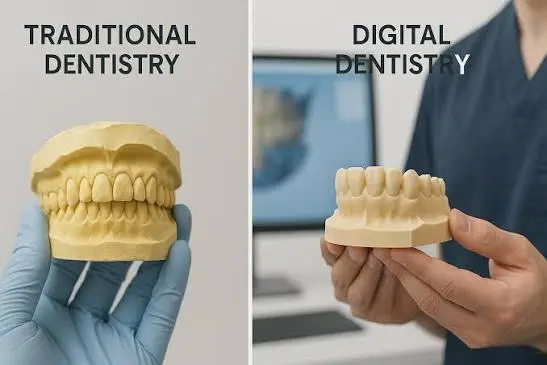
For decades, a dental model started with the same step: a tray of impression material pressed over the patient’s teeth, followed by a plaster or stone model poured from it. It is a proven method, and millions of crowns, bridges, and appliances have been made this way.
Today, many labs and clinics are moving to a digital workflow. A scanner captures the teeth, software designs the case, and a 3D printer produces the model.
This raises an important question for any dental professional: which one is more accurate?
The honest answer is that it depends on how each method is done. In this guide, you will learn how dental model accuracy compares between 3D printing and traditional impressions, where errors come from in each workflow, and how to get the best results from either one, in plain and simple language.
This article is general information for dental labs and clinics. It is not clinical advice. Always follow the instructions of your materials’ manufacturers and the standards that apply to your practice.
What Does “Accuracy” Mean in Dental Models?
Before comparing methods, it helps to understand what accuracy really means. In dentistry and research, two words come up often:
- Trueness: How close the model is to the real teeth or to a reference. A model with good trueness has dimensions that match reality.
- Precision: How consistent the results are when you repeat the process. A precise method gives nearly the same result every time.
A good method needs both. A process that is true but not repeatable is unreliable. A process that is repeatable but always slightly off is consistently wrong.
In practice, accuracy also means that the model fits. A crown made on the model should seat properly in the mouth, an aligner made from the model should fit the teeth, and a surgical guide should sit correctly. That real-world fit is the standard that matters most.
How Traditional Impressions and Stone Models Work
The traditional workflow has several steps:
- Choose a tray and impression material, such as alginate for general use or silicone and polyether materials for more precise work.
- Take the impression by seating the tray over the teeth until the material sets.
- Disinfect and handle the impression.
- Pour dental stone or plaster into the impression.
- Let it set, then separate the model.
- Trim and finish the model.
When done carefully, this method gives excellent results, and it is trusted for a reason.
Where Errors Can Creep In
Every step is a chance for small distortions:
- Material shrinkage or distortion. Some impression materials change shape over time, especially alginate, which can lose or absorb water.
- Tray problems. A flexible or poorly fitting tray can distort the impression.
- Air bubbles or voids in the impression or the stone.
- Delay before pouring. Waiting too long can let the material change.
- Disinfection and storage. These can affect some materials.
- Stone expansion. Dental stone expands slightly as it sets.
- Handling and shipping. Stone models can chip or break, and impressions can distort in transit.
- Technique differences between operators.
None of these are unavoidable, but they are the reasons that careful technique and good materials matter so much.
How the 3D Printed Dental Model Workflow Works
The digital workflow replaces some or all of these steps:
- Capture the teeth, either with an intraoral scanner in the mouth, or by scanning a traditional impression or stone model with a lab scanner.
- Create a digital model and design the case in dental software.
- Prepare the file for printing, including orientation, supports, and base design.
- Print the model on a resin 3D printer using a dental resin.
- Wash and cure the print as the manufacturer recommends.
- Remove supports and finish the model.
Resin printers use thin layers of UV-cured resin to build the model. If you want to understand how resolution affects printed detail, read our guide on how to compare resin 3D printers by build volume and XY resolution.
Where Errors Can Creep In
Digital workflows have their own sources of error:
- Scan accuracy. Intraoral scanners stitch together many images, and small errors can add up over a full arch.
- Scanning conditions. Saliva, blood, movement, and tricky areas like deep margins can affect the scan.
- Software and design choices, such as how the file is processed and exported.
- Printer calibration. If the printer is not calibrated, models will be off in size.
- Resin shrinkage. All resins shrink slightly as they cure, and different resins behave differently.
- Print orientation and supports. How the model sits on the build plate can affect shape and accuracy.
- Layer height and resolution. These affect detail and surface quality.
- Post-processing. Washing, curing, and heat can distort a model if done incorrectly.
- Storage. Some printed models can slowly change shape if stored badly.
The good news is that, just like with traditional methods, most of these can be controlled with a consistent, tested process.
So Which Is More Accurate?
Here is the fair and honest summary.
- Both methods can produce clinically acceptable models when done well.
- Research results vary. Different studies compare different scanners, printers, resins, and materials, and they do not all reach the same conclusions.
- For many common uses, such as study models, orthodontic models, and many crown and bridge cases, well-run digital workflows can be comparable to traditional ones.
- For long-span and full-arch cases, the situation is more demanding for both methods, because small errors can add up across the whole arch. Many professionals take extra care here.
- The process matters more than the label. A carefully managed digital workflow can beat a sloppy traditional one, and the other way around.
In other words, “3D printed” or “traditional” is not what decides accuracy. The quality of each step does.
Side-by-Side Comparison
| Factor | Traditional Impressions and Stone Models | 3D Printed Digital Models |
|---|---|---|
| How the data is captured | Physical impression | Intraoral scan, or scan of an impression or model |
| Main materials | Impression material and dental stone | Dental resin |
| Major error sources | Material distortion, bubbles, pouring, stone expansion, handling | Scan errors, calibration, resin shrinkage, orientation, post-processing |
| Repeatability | Depends on operator and technique | High, if the workflow is controlled |
| Duplicating a model | Needs a new impression or pour | Reprint the same file |
| Storage | Physical space for models | Digital files |
| Shipping | Fragile, can break | Send files digitally |
| Remakes | Often need a new impression | Can reprint from the saved file |
| Surface detail | Good | Good to excellent, depends on printer and settings |
| Upfront cost | Lower | Higher (scanner, software, printer) |
| Running cost | Materials per case | Resin and printer upkeep |
| Learning curve | Familiar to most professionals | Needs training in scanning, design, and printing |
These are general comparisons, and results depend on equipment and technique.
Where 3D Printed Models Have a Clear Advantage
Even when accuracy is similar, digital workflows offer practical benefits.
- Repeatability. A saved file can be reprinted any time, with the same geometry.
- No stone storage. Digital files replace shelves of physical models.
- Faster communication. Files can be sent to a lab or clinic instantly.
- Easier remakes. If a model is lost or damaged, you can print another.
- Consistent output. Once your process is tuned, results are easier to repeat from one case to the next.
- Complex designs. Software lets you add custom bases, hollow models, and built-in features that save material.
- Comfort for patients. Many patients find intraoral scanning more comfortable than traditional trays.
Where Traditional Impressions Still Make Sense
Traditional methods remain valuable.
- Familiar and proven. Many professionals have decades of experience with them.
- Lower upfront cost. There is no need to buy a scanner or printer.
- Useful in hard-to-scan cases, such as heavy bleeding, deep subgingival margins, or limited access.
- Often a good backup. Some clinics keep both options available.
- Can feed a digital workflow. A good impression or stone model can be scanned in the lab and then printed.
Many practices end up using a mix, depending on the case.
How to Get the Most Accurate 3D Printed Dental Models
If you choose a digital workflow, a consistent process is the key to accuracy. Here is how to protect it.
1. Use Dental Resin Made for the Job
Choose resins designed for dental models and follow the manufacturer’s instructions exactly. Different resins shrink differently, so settings that work for one may not work for another.
2. Calibrate Your Printer
Run calibration prints and measure the results. Check that dimensions match your design. Repeat this whenever you change resin, replace parts, or notice problems.
3. Keep the Printer in Good Condition
A clean, level build plate, a healthy release film, a clean vat, and a good screen all matter. Our guide on when to replace a resin printer’s LCD screen explains how screen wear can reduce accuracy, and our article on NFEP film covers the release film.
4. Choose a Printer with Suitable Resolution
Higher resolution helps capture fine detail, but remember that pixel size matters more than the “K” label. Our guide on 8K vs 16K resin 3D printers explains how resolution affects print quality.
5. Plan Orientation and Supports Carefully
How a model sits on the build plate affects accuracy. Follow your resin manufacturer’s recommendations and test different orientations for your own cases. Keep supports away from critical surfaces such as margins and occlusal contacts.
6. Use a Consistent Layer Height
Finer layers give smoother surfaces, but they also take longer. Choose a layer height that balances detail and speed for your cases.
7. Mix and Store Resin Properly
Stir or shake the resin as directed, keep it at a steady temperature, and store it away from light. Cold or poorly mixed resin can cause inconsistent results.
8. Follow Washing and Curing Instructions
Wash the model with the recommended solvent and time, and cure it according to the manufacturer’s instructions. Under-curing leaves models weak, and over-curing or too much heat can cause distortion.
9. Store Models Correctly
Keep finished models away from heat and direct sunlight, and avoid leaving them under pressure. Some resin models can change shape slowly if stored badly.
Verify, Do Not Assume
Check your results regularly. Print a reference model with known dimensions, measure it, and compare it with the file. Check the fit of real cases, and keep notes on settings, resin batches, and outcomes.
How to Get the Most Accurate Traditional Impressions
If you stay with traditional methods, careful technique protects accuracy too.
- Choose a rigid, well-fitting tray.
- Use the right material for the case, following the manufacturer’s mixing and timing instructions.
- Control moisture and temperature.
- Inspect the impression for bubbles, voids, and tears before pouring.
- Pour within the recommended time.
- Use quality dental stone and mix it accurately, following the water-to-powder ratio.
- Handle and store models carefully.
- Document your technique so results stay consistent across operators.
Combining the Two: A Hybrid Workflow
You do not have to choose one or the other. Many labs use a hybrid approach:
- Take a traditional impression.
- Pour a stone model, or scan the impression directly with a lab scanner.
- Design the case digitally.
- Print the final working model.
This lets you keep the familiar chairside step while gaining the benefits of digital design and printing. It is also a good way to build confidence before moving fully to intraoral scanning.
Safety and Workflow Considerations for Dental Printing
Resin printing comes with safety needs, especially in a clinic or lab where many people work.
- Use good ventilation and keep resin away from patient areas.
- Wear gloves and eye protection when handling liquid resin.
- Store resin properly and dispose of waste correctly.
- Follow infection control rules for impressions, models, and equipment.
Our guide on resin 3D printing safety covers ventilation, gloves, storage, and waste disposal in detail.
Common Mistakes to Avoid
- Assuming digital is automatically more accurate, or automatically less accurate
- Using a non-dental resin for dental models
- Skipping printer calibration
- Ignoring resin shrinkage and batch differences
- Using the same settings for every resin
- Skipping or rushing the wash and cure steps
- Printing with a worn screen, dirty vat, or damaged film
- Placing supports on critical surfaces
- Storing models in hot or sunny places
- Not checking the fit of real cases
- Failing to document settings and results
Quick Decision Checklist
Choose a digital 3D printed workflow if you want:
- Repeatable models you can reprint at any time
- Faster file sharing and less physical storage
- Easier remakes and consistent output
- Support for modern digital dentistry tools
Choose or keep traditional impressions if:
- Your budget for equipment is limited
- Your cases are hard to scan
- You and your team are very experienced with the method
- You want a reliable backup option
Consider a hybrid workflow if:
- You want to move to digital gradually
- You work with both scanned and physical impressions
Always:
- Follow manufacturer instructions
- Calibrate and verify your process
- Check the fit of real cases
- Keep records of your settings
FAQ
Are 3D printed dental models as accurate as stone models?
Well-managed digital workflows can produce models that are comparable to stone models for many uses. Research results vary, and accuracy depends on the scanner, printer, resin, and technique.
What affects the accuracy of a 3D printed dental model?
Scan quality, software handling, printer calibration, resin shrinkage, print orientation, supports, layer height, washing, curing, and storage all play a part.
Is intraoral scanning more accurate than traditional impressions?
Not always. Intraoral scanning is very accurate for many cases, but long full-arch scans and difficult areas can be challenging. Traditional impressions have their own sources of error. Careful technique matters in both.
Can I print models from a traditional impression?
Yes. You can scan a traditional impression or a stone model with a lab scanner, design digitally, and print the model.
What type of resin should I use for dental models?
Use resins made for dental models and follow the manufacturer’s instructions. Different resins have different shrinkage and handling needs.
How often should I calibrate my printer?
Calibrate when you set it up, whenever you change resin, replace key parts, or notice accuracy problems. Regular checks with a reference model are a good habit.
Do 3D printed models change share over time?
Some can, especially if stored in heat or under pressure. Store models properly and check older models before using them for precise work.
Is 3D printing cheaper than traditional methods?
There is a higher upfront cost for a scanner, software, and printer, but many labs save on materials, storage, shipping, and remakes over time.
Do I need to stop using traditional impressions?
No. Many practices use both, depending on the case. A hybrid workflow is a good middle step.
Conclusion
The real answer to “3D printing vs traditional impressions” is that accuracy depends on the process, not the label.
Traditional impressions are proven and familiar, but they have many manual steps where distortion can creep in. Digital workflows offer repeatability, easy storage, and faster sharing, but they depend on good scanning, careful printer calibration, and the right resins. For many cases, both methods can produce clinically acceptable models. The best approach is to understand the weak points of each, control them, and always check the fit of real cases.
If you are exploring digital dentistry, take a look at our range of resin 3D printers, dental resins, and accessories at MCast 3D. If you are not sure which printer or resin suits your lab or clinic, contact our team and we will help you choose a setup that fits your needs.